Read more
The post 22 Best Practices for Surveys: Tips for Writing, Design, and Analysis appeared first on Interaction Metrics.
]]>You’ve probably been on the receiving end of a bad survey.
Maybe it asked you to rate a delivery you never received. Or it forced you to choose between three irrelevant response options, none of which applied to you.
Or perhaps you actually took the time to explain a problem in your own words, and no one followed up.
These moments damage brands as much as they annoy respondents.
They’re a testament to the fact that online surveys are everywhere, but most are careless, biased, or just plain useless.
Even worse, a poorly executed survey will fail to represent your population at large. It will nag rather than invite, and worst of all, won’t gather actionable insights and KPIs.
At Interaction Metrics, we believe the survey process should be treated like any other mission-critical business function: with discipline, accountability, and respect for survey participants.
This article shares the exact best practices we use to guide our own survey designs. They’re the same methods we use every day to help clients collect reliable data and make confident business decisions.
If you’re looking for a partner who handles every step, from identifying your target population to interpreting your survey data, get in touch. We’d love to hear about your survey goals.
Best Practices for Writing Good Survey Questions
Most surveys fail because the questions were flawed from the start.
They’re too long. They introduce bias. They sound like they were written without any real thought about the target audience. They chase too many topics, and the data collected ends up shallow, scattered, and hard to act on.
In this section, we’ll look at how to write a good survey questionnaire that avoids common flaws so you can ask clear, neutral questions that provide accurate answers and meaningful data.
1. Start With a Clear Goal
Every survey project should begin with a crystal clear goal.
“Get feedback” isn’t a goal.
“Figure out whether our new onboarding flow is frustrating customers” is.
If you’re trying to cover multiple unrelated topics (like onboarding, pricing, and customer support), split them into separate questions.
Or better yet, create a survey for each topic. This way, you’ll know the details to improve in specific areas.
Takeaway: Before you write your first question, determine exactly which business decisions the survey needs to support.
A good goal does two things:
- It ties directly to a decision you’re trying to make.
- It defines what should—and shouldn’t—be part of your survey design.
Before you move forward, write down your survey’s goal in one complete sentence. If you can’t do that, you’re not ready to write the survey.
2. Ask Compelling (but Non-Leading) Questions
A well-written survey question should walk a fine line: It needs to be interesting enough for the survey respondent to want to answer, but neutral enough not to shape how the respondents answer.
One common mistake is question wording that pushes people toward a specific opinion.
For example, “How satisfied were you with our helpful and knowledgeable staff?”
Questions like this assume the staff was both helpful and knowledgeable.
Instead, try something like “On a scale of 1-5, how would you rate your interaction with our staff?”
This uses a clear response scale, gives room for a range of answers, and doesn’t suggest a preferred outcome.
When drafting your questions:
- Avoid emotionally loaded terms like “amazing” or “excellent.”
- Stick to clear response categories (e.g., “Very satisfied” to “Very dissatisfied”)
- Use multiple-choice questions with mutually exclusive options
Once you’ve written a draft, test it with someone not involved in your survey research.
Ask them:
- Were there any questions where you felt nudged to respond a certain way?
- Did you think any of the wording assumed how you felt?
- Did any questions feel hard to answer honestly?
What feels neutral to you might sound pushy to someone else, especially if they’re not thrilled with your service.
If your goal is to understand the truth, your job is to make every question feel safe, simple, and judgment-free.
3. Keep Your Survey Focused On One Topic at a Time
Every question in your survey should point toward the same research goal.
This is critical when you’re dealing with self-administered surveys, where there’s no interviewer to guide the flow.
If you veer off-topic, you risk losing your survey participants’ attention.
Say your survey mode is email, and you’re trying to evaluate your new onboarding flow.
Halfway through the survey, you suddenly ask: “How satisfied are you with our pricing?”
Now the survey respondent is shifting gears, thinking, “What does pricing have to do with onboarding?”
Their answer might be valid, but it doesn’t serve your objective. It introduces noise instead of clarity.
This is different from double-barreled questions (which we’ll cover shortly).
Here, we’re talking about maintaining focus across the full survey, so every question fits together in a coherent, logical order.
If you’re tempted to squeeze in unrelated feedback, ask yourself: “Do I need another question—or an entirely different survey?”
4. Use Natural, Conversational Language
Customers don’t say things like “I somewhat disagree.”
They say, “Not really” or “It was okay.”
The language you use in your questions—and especially your response categories—should reflect how people really talk.
The more natural the phrasing, the more likely survey respondents are to give honest, thoughtful answers.
Instead of:
- “Please indicate your level of satisfaction with our service representative.”
Try:
- “How would you describe your experience with our team member?”
Even your closed-ended questions should use plain, everyday language. Options like “Bad,” “Okay,” and “Great” are easier to interpret than formal phrases like “Strongly Disagree” or “Very Dissatisfied.”
If your question wording feels stiff or confusing, you’ll either lose people entirely or collect data that doesn’t reflect reality.
At Interaction Metrics, we’ve seen this play out time and again: When questions sound human, customers give more thoughtful answers.
When they sound robotic, customers either drop off or speed through.
5. Avoid Double-Barreled Questions
Double-barreled questions ask about two different things in the same question—but only allow one answer.
Example: “Was your waiter prompt and polite?”
That might sound harmless, but what if the waiter was fast and rude?
The same question is trying to measure two behaviors. And now your data collection is flawed.
These questions cause confusion, harm data quality, and make it impossible to accurately measure what your customer really experienced.
But it’s not the same as asking a leading question. Leading questions steer people toward a specific answer. Double-barreled questions cram multiple concepts into one sentence and force a single response.
To fix it, just separate the topics:
- “How would you rate the promptness of the service?”
- “How would you rate the politeness of the staff?”
6. Ask Only Relevant Questions
If a question doesn’t apply to someone, don’t make them answer it.
Say you’re asking about gym habits.
If a respondent doesn’t go to the gym, asking them how often they attend or what equipment they use just feels sloppy.
That’s where question logic comes in.
Also called branching or skip logic, it means you only show questions based on how someone answered earlier ones. If they didn’t use your mobile app, don’t ask five questions about it.
If your survey software doesn’t support logic, at least include a “Not applicable” option.
If you don’t, you introduce bias that can tank your data quality.
This matters even more when you’re asking about sensitive subjects like medical history, gender identity, or demographic information. If a question just doesn’t apply, your survey needs to respect that.
This is one of the core principles behind best practices survey design: relevance improves honesty, and honesty improves outcomes.

7. Let Customers Answer Anonymously
About half of all survey participants prefer to remain anonymous. When you give them that choice, you’re far more likely to get detailed, honest answers, especially when you’re covering sensitive questions or potentially sensitive topics.
But doesn’t anonymity conflict with segmentation?
Not if you design your survey correctly.
You don’t need someone’s name to group them meaningfully.
Here’s how:
- Use early questions to capture demographic information, behaviors, or product usage
- Allow people to skip identity-related questions if they choose
This lets you segment results without sacrificing anonymity or trust.
In fact, anonymous surveys help minimize bias, especially when dealing with qualitative research methods like open-ended questions or focus groups.
When you pair anonymity with smart research methods, like conducting cognitive interviews during testing, you dramatically improve the honesty and reliability of your survey results.
8. Consider Not Sending a Survey at All
Surveys are powerful, and there are many different kinds. But depending on your goal, they’re not always the right tool.
If you’re trying to understand why customers feel a certain way or explore how they interpret a sensitive subject, sometimes other research methods work better than a digital or paper survey.
Use interviews when you need depth.
Live conversations allow for follow-up questions and nuance. They’re ideal when you’re dealing with emotion, complexity, or context that’s hard to capture in a closed-ended question.
Use usability studies when you’re testing processes.
You can ask people what they think of your website, or you can watch them use it. Watching gives you real-time insight that most surveys can’t provide.
Use personal outreach when you need quick feedback.
If you’re looking for input from a specific segment, like recently churned customers, skip the survey.
A short, focused email or call often leads to richer insights.
Use Service Evaluations when you need to have better interactions with customers. They’re useful when you want an in-depth examination of your call, chat, and email conversations—and want to know how to get more value from them.
If you notice the following signs, it’s worth considering if you’d be better off skipping the survey altogether.
- No matter what you’ve tried, no one responds to your surveys, or your customer/employee database is tiny to begin with.
- You’re not learning anything new from your surveys.
- You’re tackling topics that are personal, emotional, or complex.
Choosing the right method upfront saves you time, protects customer goodwill, and leads to stronger, more actionable insights.
Best Practices for Good Survey Sampling
Even the best-written survey won’t help if you’re asking the wrong customers —or the right customers in the wrong proportions.
Sampling doesn’t get much attention. It’s not shiny. But it’s the foundation of trustworthy data.
Get your sample wrong, and everything else collapses.
Sample too small? Your data won’t represent your customer base. You’ll make decisions based on outliers, not trends.
Sample too big? You might waste time and money collecting more survey responses than you need without gaining any detailed information that leads to clarity.
Worse, many companies fall into the habit of surveying only the easiest-to-reach customers—recent buyers, email openers, loyal fans. That creates a false sense of confidence while overlooking the quiet churn risks or casual users who see your business differently.
If you want reliable insights and segmented results you can act on, you need a sample that reflects the full spectrum of your customer base.
9. Survey the Right Customers (Or Employees)
You can’t improve the customer experience if you only hear from your happiest customers or employees.
For example, a good customer sample includes:
- Your newest customers
- Multi-year repeat buyers
- Those who’ve stopped engaging
- Customers who’ve never contacted support
- Customers who always contact support
Each of these groups experiences your business differently.
If you don’t hear from all of them, your survey data becomes lopsided, and your decisions follow suit.
And here’s the bigger point: without a mix of perspectives, you lose the ability to segment your results.
Segmentation lets you break down feedback by:
- Customer tenure (new customers vs. longtime customers)
- Behavior (heavy users vs. occasional users)
- Demographics (age, region, income, etc.)
It’s how you find out if first-time buyers are struggling with your sign-up flow. Or if high-value customers are quietly getting frustrated over a UX issue you had no idea existed.
No segmentation means no context. And without context, your survey is just a pile of averages.
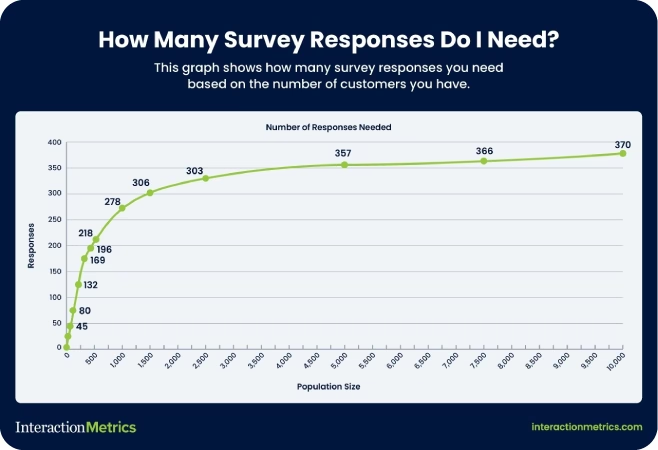
10. Calculate the Correct Sample Size
It’s tempting to just survey whoever’s easiest to reach.
Don’t.
You need enough responses to make your data statistically valid—and evenly distributed enough to represent your whole customer base.
Here’s what that means:
- Generally speaking, the bigger your customer base, the larger your sample needs to be – up to about 370 responses per population.
- Margin of error and confidence levels aren’t technical fluff; they tell you if your results reflect reality.
Not sure how many responses you need? Use Interaction Metrics’ free Sample Size Calculator. It only takes 30 seconds to learn a whole lot more about what your survey really needs.
11. Randomize Your Outreach Whenever You Can
If your survey only goes to people who clicked your last email, you’re already working with a skewed sample.
Randomizing your outreach means every customer has an equal shot at being included, not just the people who are most engaged or easiest to reach.
Even simple randomization (like choosing every 10th customer on a list) can go a long way toward protecting the integrity of your data.
12. Use Quotas to Balance Customer Types
Randomization helps, but sometimes you need to go a step further.
Quotas let you control how many responses you get from each customer segment, so you don’t over-represent one group while leaving another out.
Examples of quotas (depending on how many subjects you have):
- 25% of responses from new customers
- 25% from long-time customers
- 25% from inactive users
- 25% from churn risks
This doesn’t mean you reject responses once a group hits its quota. But it does mean you proactively seek out underrepresented voices until you’ve got a balanced view of your audience.
The result? Data that shows you not just the average, but the differences between groups.
13. Monitor and Adjust As Responses Come In
Sampling isn’t “set it and forget it.”
You might start out with a randomized list or a balanced quota plan, but if certain groups don’t respond as expected, your sample can still go off-course.
That’s why it’s important to monitor your response patterns in real time.
If you notice that:
- Responses are coming mostly from one demographic,
- A particular segment isn’t participating,
- Or you’re trending too heavily toward one behavioral group…
Pause and recalibrate.
That could mean:
- Sending a reminder to only a specific subgroup
- Extending the window for lower-response segments
- Offering an incentive just to the group that’s underrepresented
Remember: you’re aiming for coverage, not just volume.
A great sample isn’t one that fills up fast. It’s one that tells the full story.
Best Practices for Survey Invitations
How you invite customers to take your survey says everything about how much you value their time and opinions.
A bad invite feels like spam.
A great one feels like an opportunity.
Here’s how to craft survey invitations that people want to answer.
14. Craft a Human, Personalized Survey Invite
If your survey invitation comes from “noreply@company.com,” you’ve already lost.
People don’t want to be talked at. They want to be spoken to.
Good invites:
- Come from a real person’s name and email address.
- Thank the customer for spending their time completing the survey
- Are specific about why the customer’s feedback matters.
The idea is simple: show your customers you respect their time before you ask for more of it.
15. Write Warm, Creative Subject Lines
Want your survey email to get deleted immediately?
Generic subject lines scream “bulk email.” They kill your open rates before you even get a chance.
Better options:
- Focus on customer impact: “Help shape your next experience.”
- Highlight a small reward: “We’d love your opinion—coffee’s on us.”
- Make it intriguing: “Got 60 seconds? We’ll make it worth it.”
Skip the word “survey” altogether if you can. Customers should feel like they’re joining a conversation, not completing a chore.
16. Offer Thoughtful Incentives (Without Overpromising)
Incentives are a great way to increase response rates—but only if they feel genuine.
Nobody believes they’ll win a $500 Amazon gift card for taking a survey. And even if they did, dangling big prizes can cheapen your brand.
Instead, small, guaranteed gifts show real appreciation.
Try offering a modest Starbucks card. A discount code. Early access to a new feature.
Interaction Metrics has seen success with “a latte on us” style incentives. Small surprises create positive reciprocity without making you sound desperate.
17. Actively Listen and Follow Up with Respondents
The moment someone completes your survey, the relationship changes.
They’ve invested time. They’ve told you something real. Now you owe them something back.
Even a small follow-up makes a huge difference. Customers don’t expect instant changes. But they do expect to know they were heard.
Fail to follow up, and they’ll never bother answering your next survey.
Good surveys start with a good invitation. They end by showing that someone on the other side was actually listening.
Best Practices for Analyzing Survey Data
A finished survey isn’t the end of the process. It’s the start of decision-making.
But that only works if the way you analyze the data is just as thoughtful as the way you designed the survey. Otherwise, you’re making business decisions on bad math, shallow insights, or noise.
Here’s how to avoid that.
18. Pre-Test Before You Launch (And Read the Results Like a Customer Would)
Yes, you should test your survey with a small group before sending it out.
But don’t just look for typos or broken logic. Pay attention to the actual experience of taking the survey.
- Do the questions flow naturally?
- Are any answer options missing?
- Are there moments where people hesitate to answer or feel boxed into a specific response?
Ask testers what they thought you were trying to learn after they’ve seen your survey.
Clarity is everything—both for the person answering and the person reading the results. If their answers don’t match your actual goal, rewrite your questions.

19. Break Down Your Results by Segment
If you want to understand your customer experience, you have to see how different groups are experiencing it differently.
Start by segmenting your results:
- New vs. longtime customers
- High-value vs. low-value buyers
- Different age groups or regions
- Different product or service lines
Maybe new customers love the onboarding, but longtime users are frustrated with upgrades. You’ll never see that if you lump everyone together in a single group.
If you’re serious about improving the experience, you need to know who is thriving—and who is struggling.
20. Visualize the Data
Averages smooth out the bumps—but those bumps are where the real problems live.
Instead of just looking at the mean score, visualize the full spread of your data.
Tools like histograms, scatterplots, or simple bar charts can show you:
- Whether responses cluster around a few scores
- Whether there’s a big gap between satisfied and dissatisfied customers
- Whether there’s a silent middle that might be getting overlooked
21. Study the Extremes to Spot Hidden Patterns
Your most passionate customers—whether they’re thrilled or furious—often know something others don’t.
Once you have your distribution mapped, study the extremes:
- What do the happiest customers have in common?
- What do the angriest ones share?
Are the frustrated customers mostly new users? Is one product line dragging down satisfaction across the board?
Extreme responses often surface issues that averages smooth over. They’re not noise. They’re signals—if you know how to look for them.
22. Focus on What the Data Tells You to Do Next
Survey data should lead to action.
But that doesn’t mean implementing every customer suggestion. It means spotting the friction points your team can address and doing something about them.
After every survey, your team should be able to answer:
- What’s the biggest issue this data revealed?
- Who does it affect the most?
- What would happen if we fixed it?
Then share a summary with your respondents. Tell them what you learned. Tell them what’s changing.
That’s how you close the loop and keep them willing to answer your next survey.
Discover a Smarter Way to Run Surveys
Interaction Metrics is a leading survey company that believes surveys should do more than check a box. They should uncover the truth—clearly, accurately, and without bias.
That’s why we created the TrueData method.
It’s our end-to-end model for building surveys that actually lead to better decisions. With TrueData, you get more than a metric—you get a roadmap for improvement.
Here’s how the TrueData method delivers actionable insights you can use to improve the customer experience.
1. True-Facts: Scientifically Valid Questions
Every survey we run is custom-built around your goals.
We use a proprietary 20-point bias checklist to eliminate flawed constructs like leading language, irrelevant questions, and skewed answer options. That means you get honest, actionable insights—not just noise.
2. True-Tech: Enterprise-Grade Tools (Handled for You)
We license and manage best-in-class tools like Qualtrics, Alchemer, and SPSS.
No training. No extra fees. No DIY dashboards.
Just clean, professional survey deployment and analytics—handled entirely by our experts.
3. True-Insight: Advanced Analysis That Drives Action
Once the data comes in, we go beyond top-line stats.
We segment results. Analyze text. Surface patterns in the extremes. And give you plain-English reporting with real recommendations you can implement right away.
If you’re ready to stop guessing and start gathering survey insights you can actually use, let’s talk. Connect with the Interaction Metrics team to learn how the TrueData method can help you get more out of your surveys.
Frequently Asked Questions
What is the best rating scale for a web survey?
The best rating scale for online surveys is a 5-point or 7-point Likert scale. These scales offer enough variation for respondents to express their opinions clearly without feeling overwhelmed by too many options.
What is the difference between closed-ended questions and open-ended questions?
Closed-ended questions provide a fixed set of answer choices, such as multiple-choice or rating scales, making data easier to quantify. Open-ended questions allow respondents to answer in their own words, giving you richer, more detailed feedback that is harder to analyze at scale.
Can I ask demographic questions if my survey is anonymous?
Yes, you can ask demographic questions on an anonymous survey. Avoid asking members of your survey population for personally identifiable information like full names or emails. Focus on general attributes like age range, gender identity, or region.
What are the different types of biased questions on surveys?
The most common types of biased questions on surveys include leading questions, double-barreled questions, loaded questions, and forced-choice questions. Learn more about the different types of bias here.
============================================
Care to discuss your next survey? Get in touch!
============================================
The post 22 Best Practices for Surveys: Tips for Writing, Design, and Analysis appeared first on Interaction Metrics.
]]>Read more
The post What Is Customer Effort Score (CES) & Why Does It Matter? appeared first on Interaction Metrics.
]]>Customer Effort Score (CES) measures how hard it is for your customers to get help from your customer service teams. And if you’ve ever had a hard time canceling a subscription or fixing a billing issue, you know exactly why it matters.
Has this ever happened to you? You clicked through five help articles, waited on hold for 20 minutes, and answered the same question twice.
At that point, you’re well beyond annoyed and ready to give up.
That’s where Customer Effort Score (CES) comes in. You can use it to gauge which processes are frustrating for customers and how to remove that friction.
Introduced by Matt Dixon and Corporate Executive Board (CEB) in 2010, CES is now a core metric in many customer experience programs.
CES has a clear purpose, but it’s often misunderstood.
Some companies automate their CES surveys. They send them out after every interaction, regardless of context, and that in itself is a source of customer frustration.
Others drop CES into customer feedback programs without giving much thought to question design or survey timing.
The problem with this approach is that you’re left with a flood of surface-level data that’s easy to ignore and hard to act on. Companies that measure CES like this are missing the point of CES entirely, which is to find friction and fix it—not to create more friction.
That’s why we take a different approach.
Interaction Metrics is a leading survey company. We’ve seen how strategically measuring your customer effort score can reveal moments of struggle that other metrics miss.
We focus on asking the right question at the right time, using survey methods that eliminate bias and deliver meaningful insight.
Because when you understand where customers are getting stuck, you can improve service, reduce churn, and build loyalty without overwhelming your team.
Here’s everything you need to know about CES: how it works, why it matters, and how you can use it to create loyal customers who stick around for the long haul.
When you’re ready to start measuring your CES score, reach out to Interaction Metrics.
What Is Customer Effort Score (CES)?
Customer Effort Score (CES) measures how easy it is for customers to get help or complete a task when interacting with your company.
Unlike NPS (which measures loyalty) or CSAT (which gauges satisfaction), CES focuses on one thing: effort.
One way to measure effort is to ask after an interaction (like a support call or a purchase), like:
“How easy was it to handle your issue today?”
“How easy was our shopping cart?”
“How easy was your onboarding experience?”
Then you might use a 5-point, 7-point, or an emoticon scale, with the left anchor being very difficult and the right anchor being very easy. That’s it. One question. One number. And when asked at the right time, CES can uncover friction that other customer service metrics miss.
But there is another way to measure customer effort, which tends to be more accurate.
You take all the questions in your survey that imply customer effort, and calculate the average of all those variables. These could be rating questions about agent clarity, website navigation, or time-to-respond.
So instead of asking your customer if something was easy, you determine the overall ease of doing business with your company. Whether to use one question or look at variables globally depends on your objectives and what you need to know.

Why Customer Effort Score Matters for Customer Satisfaction
Your customers are busy. They have options. If dealing with your business feels complicated or frustrating, they’ll move on to competitors who offer simpler interactions.
That’s why Customer Effort Score (CES) matters so much for overall customer satisfaction.
Unlike other customer experience metrics, CES doesn’t measure how happy or loyal someone feels. It measures how hard they had to work to get what they needed.
As Bill Price, co-author of The Best Service Is No Service, famously argued, the best customer service is the one customers never have to use.
Here’s why.
- High Effort Service Interactions = Lost Customers: The harder it is to get help, the faster customers leave. Gartner found that 96% of customers who face high-effort service experiences become disloyal customers.
- Low Effort Builds Loyalty: When things feel easy, customers stick around. Providing customers with a low-effort experience leads to higher retention, more spending, and more referrals. It encourages customers to stick around and speak positively about your brand.
- CES Predicts Future Purchase Behavior: Low effort means customers are likely to buy again. High effort can signal that churn is just around the corner. Depending on the product or service, customers who feel too much friction are likely to cease buying from you altogether.
- Less Effort = Better Customer Engagement: The less effort customers spend solving problems, the more likely they are to explore your products and engage with your brand.
- You Can Identify and Remove Pain Points: CES shows exactly where customers feel stuck, whether that’s a clunky checkout, a confusing help center, long wait times, or handoffs between multiple departments.
- Reduce Customer Service Costs: When customers can help themselves, support requests go down. Fewer calls and fewer tickets translate to lower customer service costs.
CES isn’t a metric to take lightly. It reveals the truth about customer friction, and addressing it can take your entire customer experience to the next level.
If you want satisfied customers who stay, spend more, and recommend your business, reducing customer effort must be a core part of your strategy.
When to Use a Customer Effort Score Survey
Timing matters with CES.
If you send surveys too randomly, you’ll miss the exact moments when effort is highest. When you send them at the right time, CES surveys reveal where your customers struggle and how to fix it.
Here are the best times to send a CES survey, with real-world examples:
1. After Customer Support Interactions
Send a CES survey after a client chats with your customer support team or calls in for help.
Example: A customer contacts customer support to dispute a charge. Once the issue is resolved, send a CES survey and be sure to include at least one open-ended question so you can understand what’s driving your scores.
2. Following a Purchase or Transaction
Send a survey after checkout to learn how smooth the buying experience was.
Example: A customer buys a subscription online. After the confirmation email, follow up with a CES question asking how easy it was to complete the purchase.
3. During Onboarding Processes
Use CES to check if your onboarding process makes sense to new users.
Example: A new customer signs up for your platform and completes the setup wizard. After setup, ask how easy it was to get started.
4. After Using Self-Service Options
Test whether your help center, chatbot, or FAQ is actually helpful.
Example: A customer uses your help center to figure out how to reset their password. Show a CES question after they’ve finished the article to gauge the experience.
5. When Renewing or Upgrading Services
These moments often involve complex decisions or system navigation.
Example: A customer upgrades their account from a free to a paid plan. After they finish, ask how easy the upgrade process was.
6. After Addressing Specific Pain Points
Once you’ve simplified a frustrating process, check if the update worked.
Example: You redesigned your billing page to make it easier to update credit card info. Send a CES survey right after a customer uses that page to see if the change actually reduced effort.
Measuring customer effort at targeted points throughout the entire customer journey helps customers avoid overwhelm from constant surveys, and you gain clear, actionable data to drive improvements.
Next, we’ll look closely at exactly how to measure and interpret your CES results to improve overall customer satisfaction.
How to Measure Customer Effort Score: Questions, Scales & Formulas
To get the most value from your Customer Effort Score (CES), you need clarity on how to structure your surveys and interpret the results.
Here’s exactly how to measure CES effectively:
1. Choose the Right Question Format
CES surveys typically ask one straightforward question, such as:
- “How easy was it to resolve your issue today?” (standard CES question)
- “The company made it easy to handle my request.” (agree/disagree format)
Choose wording that aligns clearly with the interaction you’re assessing.
2. Select an Effective Rating Scale
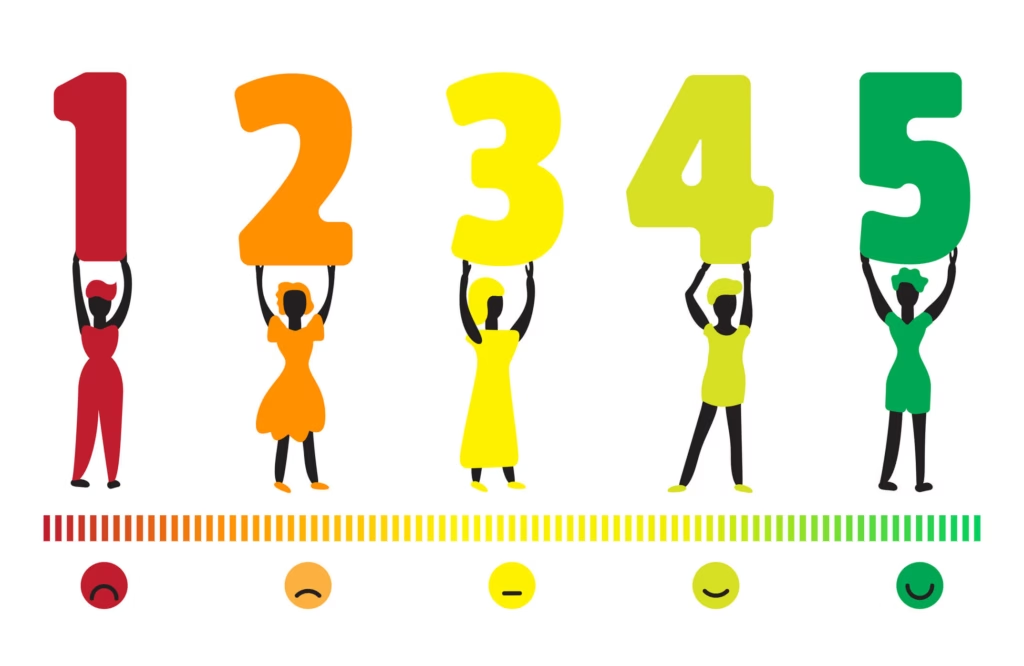
CES commonly uses one of three formats:
- Numbered Scales (most common): Usually 1–7 or 1–5 (1 = very difficult, 5 or 7 = very easy).
- Likert Scales: Customers rate their agreement with a statement from “strongly disagree” to “strongly agree.”
- Emoticon Ratings: Frowning faces for difficult interactions, neutral faces for moderate effort, and smiley faces for easy interactions.
Pick a scale that feels intuitive for your customers. Simpler scales tend to get higher response rates.
3. Calculate Your CES Score
The Customer Effort Score calculation is a simple average. Add together the total scores from all responses, then divide the total by the number of responses.
And when calculating your score, don’t forget to segment your customers so you can perform cross-tab analysis.
Breaking your customer base into smaller groups allows you to determine in what situations you’re getting particular scores, and for whom.
This way, you know you’re getting a true picture of customer effort instead of focusing on one specific group (for example, women over 50 with a bachelor’s degree) disproportionately.
Use the formula to get an average CES rating for each segment, then take the average score of each segment and use it to get an idea of overall customer effort.
Higher scores (closer to 5) indicate better customer experiences. Lower scores suggest frustration and friction.
4. Analyze Comments, Not Just Numbers
CES numbers give direction, but open-ended responses provide deeper insights.
Look carefully at customers’ written comments for common themes.
Words like “confusing,” “fast,” “frustrating,” or “easy” show exactly where your service is succeeding or failing.
What’s a Good Customer Effort Score?
A “good” CES score depends on the scale you’re using:
- On a 5-point scale, most companies aim for an average score of 4 or higher.
- On a 7-point scale, aim for 5 or higher.
If your average is creeping below those numbers, it likely means customers are encountering friction—slow response times, confusing processes, or broken self-service tools.
Here are a few points to keep in mind after calculating CES.
1. Higher Scores Are Better
Generally, you want scores on the higher end (closer to 5 or 7). Higher scores signal that your customers find interactions straightforward and frustration-free.
2. Compare to Industry Benchmarks
While there’s no universal benchmark, many companies target a CES average of around 4 on a 5-point scale (or about 5 on a 7-point scale).
If your scores are consistently lower, your customers might face unnecessary challenges.
3. Track Changes Over Time
CES is most valuable when you track it consistently and compare it month-over-month or quarter-over-quarter.
Even small improvements (like a CES increase from 2.7 to 3.0) indicate meaningful enhancements to your customer experience.
4. Look Beyond the Numbers
Don’t just rely on your average score. Analyze CES data by specific interactions, support channels, and agents. Averages alone might hide issues like specific customer support agents who are struggling or a certain product causing confusion.
5. Take Action on the Insights
The goal of CES isn’t just measurement—it’s improvement. Use CES results to clearly identify areas of friction. Then, simplify processes, improve agent training, and make proactive changes to reduce customer frustration.
How to Improve Your Customer Effort Score
CES reveals where your customers face unnecessary challenges. Once you pinpoint these pain points, here’s how to address them directly:
1. Streamline Customer Interactions
Look at the entire customer journey and remove unnecessary steps. Are customers being passed between multiple agents or repeating their problems multiple times? Simplify these interactions.
2. Enhance Self-Service Options
Invest in intuitive, easy-to-use self-service tools like knowledge bases, FAQs, chatbots, or automated phone systems. Good self-service reduces effort and prevents unnecessary interactions with your support team.
3. Offer Solution-Oriented Training
Equip your customer service representatives with the tools, training, and scripts needed to solve problems quickly. Reducing back-and-forth interactions and eliminating confusion makes a big difference in CES scores.
4. Provide Omnichannel Support
Customers often switch channels when they encounter problems. Whether starting online, via chat, or phone, be sure interactions are consistent across every channel. Customers should never feel they’re starting over each time they reach out.
5. Reduce Response Times
Shortening hold times and quickly responding to emails and chats improve customer perception. High service efficiency makes interactions feel easy and reduces customer frustration.
6. Proactively Address Common Issues
Use CES feedback to identify recurring problems (billing confusion, delayed shipments, etc.). Then proactively communicate solutions before customers even notice or complain. This approach can significantly lower your CES.
7. Monitor & Measure Progress
After taking these steps, keep tracking CES. Continuously measure whether your actions translate to lower customer effort. Regular tracking uncovers improvements and highlights new areas to optimize.
Improving your CES means happier customers, fewer service costs, and higher loyalty. Next, let’s clearly distinguish how CES compares to other popular metrics—NPS and CSAT—and why you need all three for a complete CX picture.
Customer Effort Score vs. NPS & CSAT: What’s the Difference?
Customer Effort Score is powerful. But if you look at just one metric, it’s like using a pair of prescription glasses that have only one lens.
To get a full picture of your customer experience, pair CES with other core metrics like Net Promoter Score (NPS) and Customer Satisfaction Score (CSAT).
Each one tells you something different:
- CES shows how much effort the customer had to exert.
- NPS reveals how likely they are to recommend your brand.
- CSAT captures how satisfied they were with a specific interaction.
By combining them, you uncover customer insights that would otherwise go unnoticed.
5 Customer Effort Score Mistakes to Avoid
CES can mislead you if you’re not careful. Here are common mistakes to avoid, so your CES results stay accurate and actionable.
1. Poor Survey Timing
If your CES survey isn’t sent immediately after the right customer service touchpoint, customers may forget key details. Late surveys produce inaccurate data that won’t clearly reflect true customer effort.
Always send CES surveys promptly—right after each relevant interaction, while customers’ experiences are fresh.
2. Vague or Misleading Questions
Asking unclear or overly broad questions confuses customers. A vague CES question leads to vague responses, leaving you without actionable insights.
Use precise, straightforward questions like: “How easy was it to resolve your billing issue today?”
3. Over-Reliance on Numbers Alone
CES numbers highlight general friction points but rarely explain why friction exists. If you rely solely on numeric scores, you’ll miss essential details behind customer struggles.
Always include an open-ended question for comments. Customer comments provide context and deeper insight into why your CES scores are high or low.
4. Misinterpreting Results Without Context
A sudden spike in CES may seem alarming. But it could reflect temporary issues (e.g., a website outage) rather than systemic problems.
Always analyze CES data within context. Review external factors—like service outages, product changes, or training issues—that may influence scores.
5. Failing to Take Action
Collecting CES without acting on insights frustrates customers. Customers who repeatedly share feedback without seeing improvements become disillusioned and eventually churn.
Identify issues your CES reveals. Take visible, concrete actions. Communicate those improvements back to customers to build trust and loyalty.
Avoiding these pitfalls ensures your CES surveys produce accurate data and real business improvements.

Do More Than Simply Collect Data
Customer Effort Score is a powerful tool for real improvement. But it only works if you act on what your customers tell you.
Too many companies collect CES data only to let it gather dust. They miss the opportunity to reduce friction, simplify interactions, and improve customer service altogether.
Don’t make that mistake.
When customers share feedback, they expect improvement. Listen carefully to what they say. Identify exactly where they struggle and act decisively to simplify those interactions.
At Interaction Metrics, we believe measuring customer effort should always lead directly to real change. Every survey you send should deliver clear insights, actionable steps, and measurable results.
Don’t settle for generic, one-size-fits-all surveys that deliver vague results. Go deeper. Identify pain points. Remove friction. Then, communicate improvements back to your customers.
Discover A Better Way to Measure CES
At Interaction Metrics, we believe CES demands a more disciplined, thoughtful approach.
We’re a full-service survey firm with a scientific, rigorous approach to measuring customer effort.
Our TrueData model transforms CES from raw numbers into actionable insights that drive your business forward.
Here’s how the TrueData model works:
1. True-Facts: Scientifically Valid Surveys
Every CES survey is custom-built for your company. We use an exclusive 20-point bias checklist to eliminate leading questions or skewed data. That means you get genuinely accurate survey responses that reflect true customer effort.
2. True-Tech: World-Class Survey Software
We license top-tier software tools like Qualtrics, Alchemer, and SPSS. With us, you get enterprise-level data analysis without the hassle or expense of managing software yourself.
Our experts manage all survey creation, deployment, and analytics to free up your resources.
3. True-Insight: Actionable Analysis
CES numbers alone can’t drive improvements. That’s why we go deeper. We use techniques like text mining, correlation analysis, and cross-tabs to understand the full story behind your CES scores. So you receive clear, actionable recommendations to improve your customer interactions right away.
At Interaction Metrics, we move beyond CES measurement into genuine customer experience improvement.
We pinpoint exactly why your customers experience friction. Then we provide practical guidance to simplify customer service interactions, reduce frustration, and build lasting loyalty.
If you’re serious about lowering customer effort and improving your customer relationships, Interaction Metrics has the clear, rigorous approach you need. Let’s discuss your survey needs today.
FAQs About Customer Effort Score
What is the difference between CES, NPS, and CSAT?
CES (Customer Effort Score) measures how easy it is for a customer to complete an interaction. NPS (Net Promoter Score) measures loyalty and willingness to recommend. CSAT (Customer Satisfaction Score) measures how satisfied a customer feels after a specific interaction. Using all three gives you a complete view of the customer experience.
What is a good Customer Effort Score benchmark?
A good Customer Effort Score is typically 4 or higher on a 5-point scale. Higher scores mean customers experienced less friction. Scores below 4 may indicate areas that need improvement. Trends over time are more important than one specific number.
How often should I send a CES survey?
You should send a CES survey after key customer interactions. These include after a support call, product purchase, or using a self-service feature. Timely, event-based surveys deliver more accurate and actionable feedback.
What is the best CES question to ask?
The best CES question is: “How easy was it to resolve your issue today?” It’s simple, clear, and directly tied to the customer’s experience. It works well across support, billing, onboarding, and more.
Can CES predict customer behavior?
Yes, Customer Effort Score can predict customer behavior. High-effort experiences often lead to churn, while low-effort interactions increase long-term customer loyalty and repeat purchases. CES is one of the strongest predictors of future customer retention.
============================================
Care to discuss your next survey? Get in touch!
============================================
The post What Is Customer Effort Score (CES) & Why Does It Matter? appeared first on Interaction Metrics.
]]>